Settings
The Settings area is your personal space to configure your Linklo experience.
Here, you can manage your profile information, control your notification preferences, and view your core account details.
How to Use the Settings Page
When you navigate to Settings, you'll find all your options organized into clear sections.
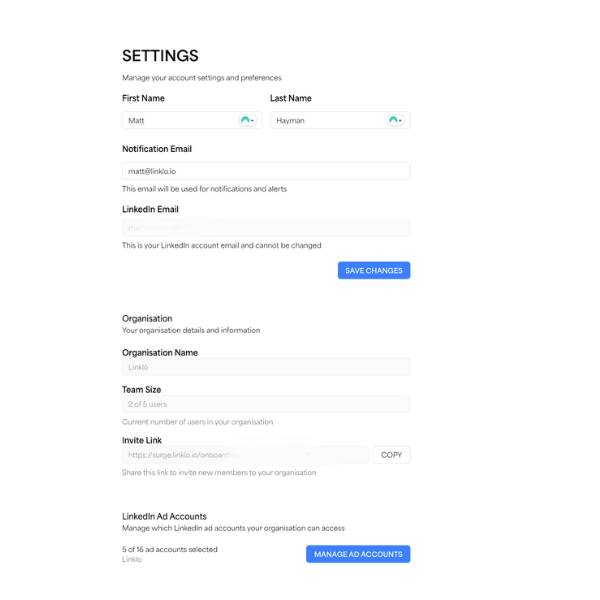
[Image Suggestion 1]
- Filename:
linklo-settings-overview.png - Description: A screenshot of the main Settings page, showing the layout with the "Profile Information" and "Account Information" sections clearly visible.
Profile Information
This section is for managing your personal details. You can update:
- First Name and Last Name: Keep your professional details accurate.
- Notification Email: This is the email address where Linklo will send you any alerts or notifications you've set up. Our system will validate the email format to make sure you don't miss any important updates.
Just make your changes and hit Save. You'll see a confirmation message letting you know your profile has been updated.
[Image Suggestion 2]
- Filename:
linklo-settings-profile-form.png - Description: A screenshot focusing on the "Profile Information" form. It would be ideal to show an example of the real-time validation, like an error message under an incorrectly formatted email address.
Account Information
This section gives you a quick overview of your account's status and is mostly read-only. It's a useful place to check:
- LinkedIn Integration: Confirms the status of your connection to your LinkedIn account.
- Account Type: Displays your permission level within your organization (e.g., Owner, Member).
- Subscription Information: Shows details about your current Linklo plan.
[Image Suggestion 3]
- Filename:
linklo-settings-account-info.png - Description: A screenshot highlighting the "Account Information" display section, showing the fields for LinkedIn Integration status and Account Type.
Any changes you make in your Settings are applied across the entire platform immediately, ensuring your experience is always personalized to your needs.